Define, Design & Deliver On Any Project In Your Life
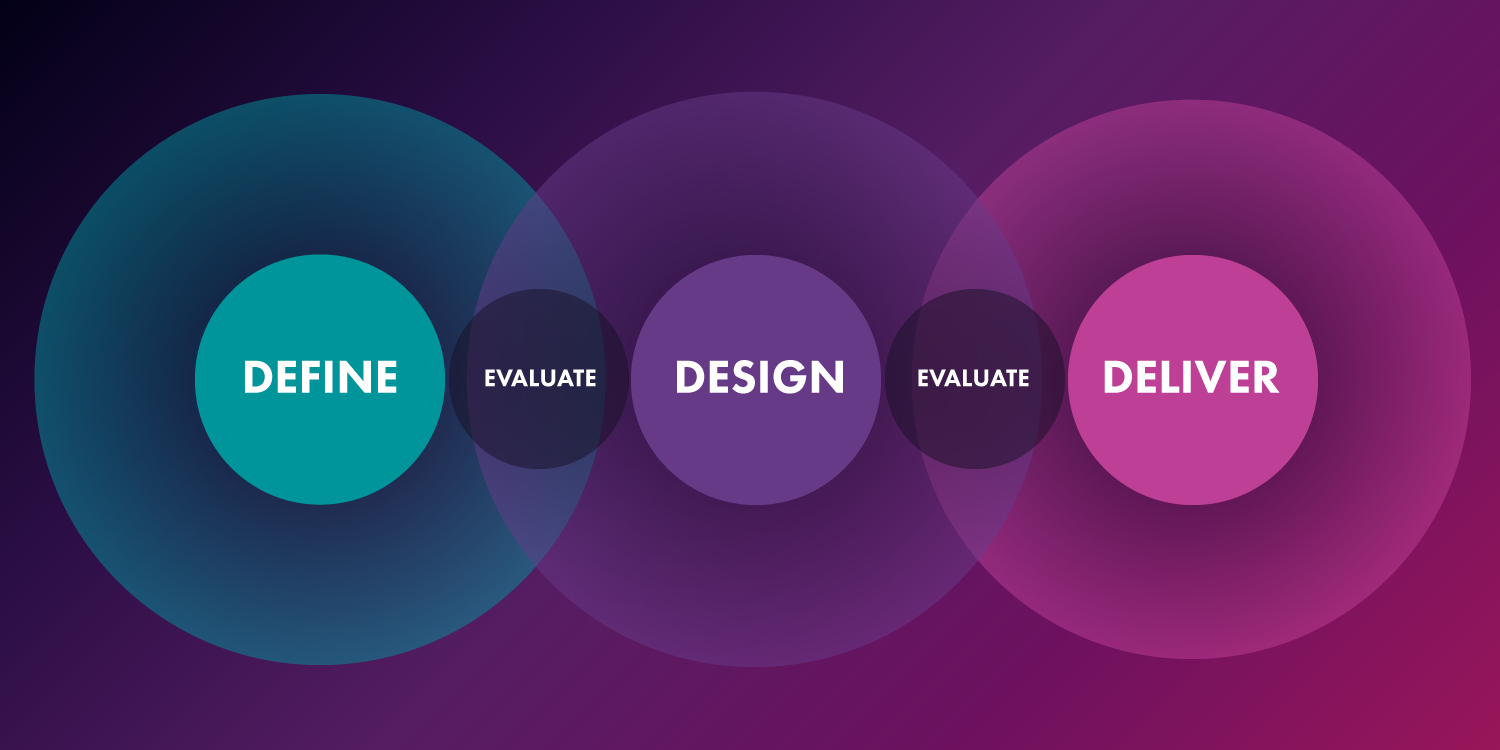
A multi-color graphic with Venn diagram label "Define" connecting word: evaluate "Design" connecting word: evaluate "Deliver"
The human-centered approach to the "User Experience Design" process is something we're extremely passionate about at SeaLab. Our passion comes from our belief the ideology's goal: to empathetically create the best experience possible for stakeholders, businesses, and users by looking at the problem holistically and tackling its parts iteratively based on feedback and testing. Though we're a design shop whose bread and butter is using the UX process to create digital experiences for our clients, we're proponents of approaching problems of all kinds with a human-first mindset. Whether the experience is for the guests at your next party, or for yourself and how you want to feel after you finish that craft or project, the UX process can be applied to all areas of life. For that reason, we've spent time defining the UX process in the most simplified and approachable version possible — to easily adapt to any challenge, in design, or in life.
If you've ever searched for "UX design process" online, you'll know that there exists far more than one solution out there. Look closely, however; every UX process shares a few similar characteristics:
- Steps Are Iterative and Cyclical
- Incorporates Design Thinking
- "Human-Centered" at Its Core.
Iterative and Cyclical
The iterative and cyclical nature of this entire process is important for the success of any human-centered design project. Rapid prototyping at lower fidelity in response to consistent feedback gathering from the right people allows more ideas to be explored and shared before committing to the final direction. This saves overall production time without sacrificing the exploration breadth of new ideas and directions.
Incorporates Design Thinking
Design Thinking is what injects the "user experience" into our "user experience (UX) process". At its core, design thinking is a human-centered practice that allows everyone to solve creative problems of all sizes. As mentioned above, design thinking is a cyclical practice that shifts views and mindsets during brainstorming, allowing for questions to be addressed from different and unique angles which can reveal new and interesting directions and provide solutions to new unearthed problems.
Human-Centered Core
Finally, being human-centered is the heart of the term "user experience". Having a process be human-centered means that research, feedback collection, and iteration based on that feedback is essential to having a successful project. This means being transparent with progress and open to adaptation. Don't make assumptions into what the target audience wants — find out! Only once we understand our target audience can we know we're helping solve problems.
The UX process SeaLab has detailed out is no different and contains all of these three elements. However, as a service shop that handles clients with all different timelines, budgets, and other constraints, (and also being big believers that "The UX Process" can be adopted toward any phase of your life) we've adopted and detailed out one of the simplest UX processes out there to allow for easy adaptation to any project: Define, Design, & Deliver.
Define
Every project, large or small, begins with a research gathering phase. This is the time to meet with your project's benefactor(s), your benefactors' target audience(s) (if applicable) aka the "users", and any other stakeholders involved in the project. The goal of these meetings is to learn as much as you can about the project as a whole, ask questions, and (when applicable) clarify the goals and constraints of the business stakeholders, technology to be used, end-users, and essentially learn where things stand and how to define a "win" from here. Depending on the specific project, additional research can be gathered and delivered to better come up with and visually capture a strategy for going forward. Based on SeaLab's experience, here are some items to include in this section of the UX process based on the unique elements and size of the project:
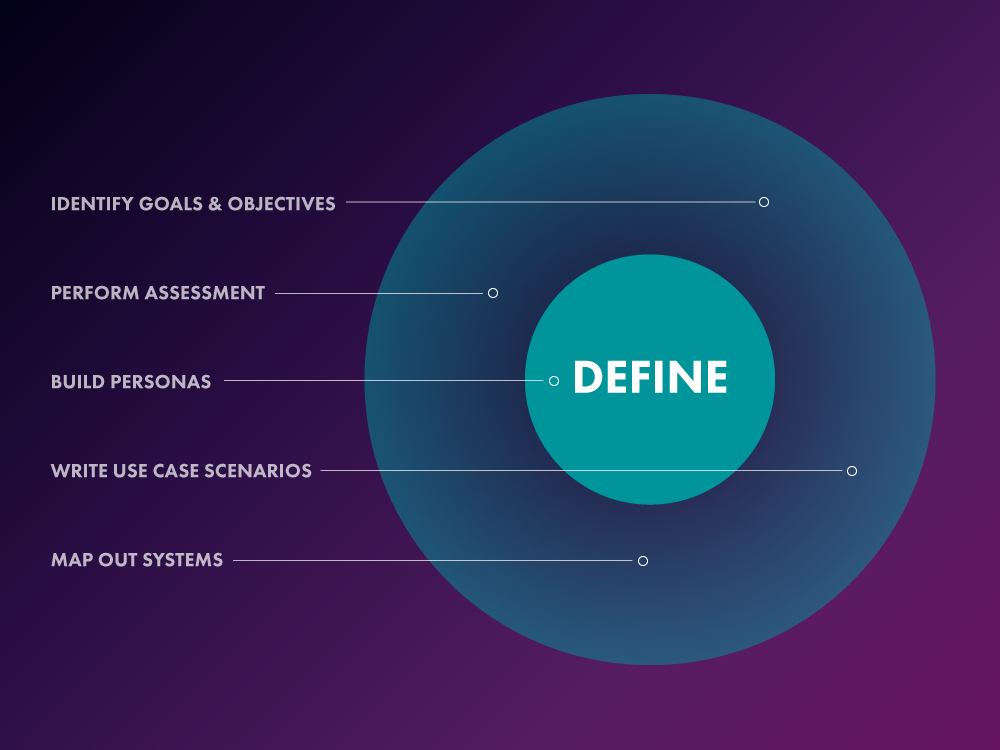
Identify Goals & Objectives
This is the single most important part of any project of any size. Whether this initial phase takes place in 5 minutes face to face, 2 hours over the phone, or several half-hour meetings over the course of 2 months, it's crucial to spend the necessary time on this step to fully understand the goals of your project. This means identifying items such as "who am I building this for?", "who is paying the bills?", "what are my timeline, budget, technology, and other constraints?" Don't be afraid to ask follow up questions after the initial meeting as they come up.
Once goals and objectives have been identified, make sure to set expectations as the final step to this stage. From cost to timeline to touchpoints, make sure who you're working for (whether it be yourself or someone else) knows how the time together will be spent and what they can expect going forward.
Perform Assessment
Now that goals and expectations are established, it's time to move on to get a snapshot of the current state of things. This means collecting information on the project and the situation surrounding the project as it currently stands.
The next thing to assess is the competitive landscape and what your project is working against. What do competitors do? How do they advertise? What do their customers have to say? Etc. By getting these data points and what other people like and don't like, a strategy can be created going forward on how to stand out and learn from mistakes and triumphs others have made. Some examples:
Creating a physical project:
- Do you have enough space to create? Do you have the proper tools? What other materials will you need that you don't have?
- Does the item I'm creating exist elsewhere? If yes, what do others have to say about it?
Creating a product for a business:
- What do customers have to say about the business? The product? What do stakeholders have to say?
- How about competitors and their customers/stakeholders? Is there anything about their product that works better or worse?
Creating a routine:
- What is your current routine? What don't you like about it? What would you rather do instead?
- How do others accomplish similar goals? What are their existing routines? Do they have any tips or tricks?
Essentially the goal of this step is to see what currently works and what doesn't to help inform us on the next steps.
Larger projects with the budget and desire to do more in-depth analysis and research can complete both qualitative and quantitative stakeholder and customer interviews and surveys. This can be more timely to create and set up but adds a much larger assortment of valuable data points to inform on the next steps. This value is amplified if the surveys are written, and time is set aside, so they can be given out both before the project and after the project for comparison.
Craft Personas
Even for smaller projects, persona creation provides value and is advisable at this stage. By giving target user(s) a name and face and taking the time to identify and put their pain points into perspective, it becomes easier to build empathy with the target demographic and begin to put yourself in their shoes for future problem solving through user journeys and use cases. If the persona is yourself for your own project, you can probably skip this step, but consider — it might be fun to try and capture yourself in data points — we say why not?
Larger projects with a more varied target audience (including administration users, logged in versus premium users, etc.), may find it useful and advisable to spend a bit more time on this phase. Getting more specific on each type of user, their pain points, characteristics, activities, etc can make all the difference in being able to solve for those problems in the design phase later.
Write Use Case Scenarios
Use Cases are important for deciding how to best execute the design phase. If the project is a website, knowing a scenario a user might have would help determine which screens will be built out as part of this situation to make sure they get adequate attention. For example, a check-out flow use case might be written as "a user forgot to purchase bananas as part of his previous grocery order and needs to purchase them quickly and add them to his existing order". This would allow the design team to not only craft the shopping interface, and the search interface but also some of the user's profile pages, existing orders flows, and even error and success screens which may not have been considered if we hadn't thought about this use case ahead of time.
This practice can also be helpful for personal projects. Specifically for thinking through "worst-case scenarios" and what to do if they occur during the project. For example:
Repainting the house:
- Use Case: I may run out of paint; solution: I'll grab an extra bucket or two while I'm at the store
- Use Case: I spilled a bucket of paint onto the lawn; solution: research different products that remove your paint type from your lawn type and grab a can while out at the store getting your extra can of paint
Crafting your morning routine:
- Use Case: My goal is to go to the gym but I tend to hit the snooze in the morning instead and hate getting up early; Solution(s): move the workout to the end of the day, go to bed earlier, get myself an alarm clock that zooms off the table and I have to find it, etc.
As with user personas, this section may deserve extra attention if the project initiator is willing and able. The more use cases we can define, the easier we can predict possible future edge cases and bumps in the timeline. These can be defined in high fidelity design deliverables, an excel spreadsheet, or even doodles on a napkin; capturing use cases for future reference so no one is caught off guard in the future is the most important part of this step.
Map Out Systems
While many projects could get away with less done in this section, larger, more complex projects could really benefit from some extra time spent mapping out systems. This step can include items such as identifying existing flows through flow diagrams, identifying established architecture information through site maps, and even creating user journey maps going through the use cases defined in our previous step. Every project will differ on what makes the most sense to deliver here, but defining these systems visually before going into the design stage will help focus the transition into design without needing to pause and craft these later.
In our experience, larger projects that take place over a longer timeline benefit from having these deliverables created to reference later down the line. It's worth designing these deliverables to keep transparency clear and goals front and center for everyone on the project.
Design
As a design agency, this is by far SeaLab's favorite part of the UX design process; where we now have a full and complete look at the project and it's goals and objectives and now we get to dive straight into "brainstorming", "more brainstorming", "sketching", "doodling", "crafting", "creating", "prototyping", "perfecting", "iterating", "tweaking", "perfecting", and best of all "finalizing" our project! Let's get going!
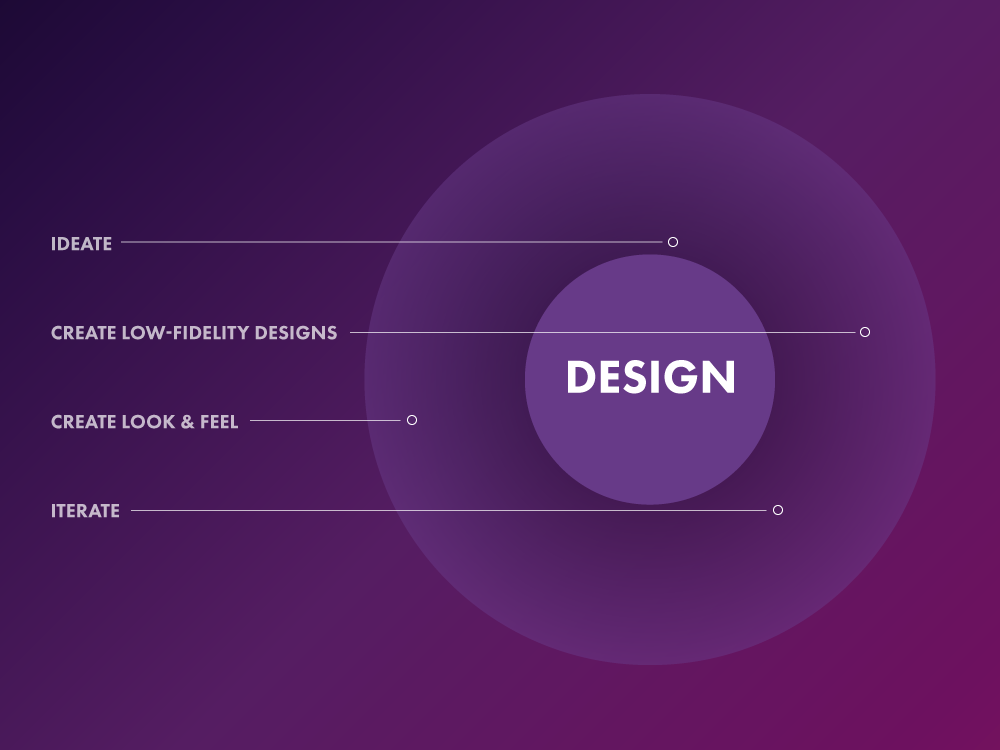
Ideate
Now that we've defined the problem as best as we possibly can within our given project constraint, we can start generating ideas for how to succeed. This can take place in many different forms with one to infinite people contributing. The goal is to create as many varying ideas as possible, come together to identify the one or few feasible options forward, and then explore and flesh these chosen ideas out in more detail. This can be done on notecards, in person, virtually, on sticky notes, in a mind map — the possibilities vary. Feel free to get creative! This is where incorporating some design thinking practices could really benefit and help tease out the unique ideas. While there are too many to list here, we've identified a few of our favorite design thinking brainstorm techniques:
- Mindmapping
- Worst Possible Idea
- Storyboards
- SCAMPER
- Brainwalk
- 6 Thinking Hats
- The 5 Whys
- And so many more...
Whenever possible, it's a great user experience practice to include stakeholders and even customers in this brainstorming process. Regardless of your comprehension of the project at this level, they likely know the problem better and (more importantly) differently and can offer insight and ideas that wouldn't have been brought forward without their contributions. It takes time to get the right people in the room, but if the project allows, this step generates more valuable ideas and builds more buy-in than not including those individuals.
As with the use cases, if constraints allow, creating deliverables from these brainstorming meetings is useful for transparency, communicating your process, and keeping goals and progress front and center as the timeline continues forward.
Create Low-Fidelity Designs/Prototypes
With our best idea(s) identified thanks to our brainstorming in the previous step, we can now start building out a low-fidelity version of our final product. Low-fidelity is important because if we treat this creation as an early prototype and focus less on form and more on function, we are able to do so more rapidly, cheaply, and we also create yet another opportunity in our cyclical process to identify potential problems or challenges needing to be re-addressed before taking the project into final production. Our goal here is to identify the design system and the components that make up its parts. Some real-life examples of this could include:
- Cooking for a party: Prepare just one meal ahead of time to test out the recipe, timing of getting everything out, etc.
- Moving into a house: measure out the house and furniture ahead of time and use sketches or a vector program to find where to put the furniture before the move.
- Planning a vacation: using Google Earth to check out streets and distance or time between locations is a great way to create a low-fidelity version of an upcoming trip.
This step should always take a large amount of time in the design phase, but larger projects with more complex problems to solve sometimes benefit from going even further and creating flow charts and life-like/life-size prototypes to better communicate these deliverables. Bonus points if the prototype can stand on its own and allows stakeholders and even customers to reference these deliverables later and add feedback for iterations.
Create/Incorporate Look & Feel
Now that flow is established and the design system decided upon, it's time to begin adding life to the project.
If "look and feel" have not yet been established, including voice, tone, branding (how do you want your project to come across to your customers?), primary and secondary colors, materials, imagery, etc; this becomes the first step to complete in this section and will deservingly require a handful of time to complete right. Know that establishing a project "brand" is a process in and of itself, which we won't go into here.
Once look & feel has been decided upon, the next step is to take the low-fidelity creation and breathe final visuals into them one component at a time. Some Examples:
Website/Application:
- Look & Feel: primary color: turquoise; secondary color: dark gray; "approachable, friendly company".
- Possible Design: main buttons: turquoise background, white text; secondary button, outline turquoise, turquoise text. Login Message: "Hello there! Please Log In below".
A Painting:
- Look & Feel: bright and positive yet realistic and believable.
- Possible Design: sketch out characters over and over again, observing and sketching real people for practice. Attempt to capture "happiness" such as smiling faces; use lighter, more pale shades of colors.
Wood Working Project (Chair):
- Look & Feel: Sturdy. Fit to go in a hunter's lodge in the living room alongside other hunting lodge decor.
- Possible Design: mimic similar wooden styles in the lodge — same wood, same thickness. Match wood stain to other wooden furniture etc.
Larger projects with more complex interfaces and actions may benefit from adding extra time to define even more behaviors. For example, spending time defining not only the general style and look & feel of a project, but defining even the smaller minute elements to really take things to the next level. For example, Target has defined the store's "smell" as part of it's "look & feel". Some websites have loading animations defined, and so on.
hese small elements can take a project to the next level if time allows. This is an easy way to "delight" end users with those small but thoughtful details. However keep in mind delighters are meant to look at last for a reason — the project basic needs must be met before delight should be focused on, otherwise they become a potential frustration.
Iterate
Each section above includes touchpoints with the stakeholders and customers when possible to collect feedback and test out assumptions being made. The purpose of these touchpoints is to make this entire process as cyclical as possible — and allow for iterations and tweaks to be made throughout as the project moves forward. It's possible to go through multiple design rounds before proceeding to deliver. Only once everyone is happy with everything, we move on to the final step: Deliver.
Deliver
We did it! Now it is time to hand off your creations so they can stand on their own without you. The deliverables will differ for every project so be ready to zip up multiple versions of your project in different formats. Oh and most of all — congratulations! For a real-world example of this Deliver phase in action, see how we handed off a touch-friendly design system for TreeHouse consultants in the field.
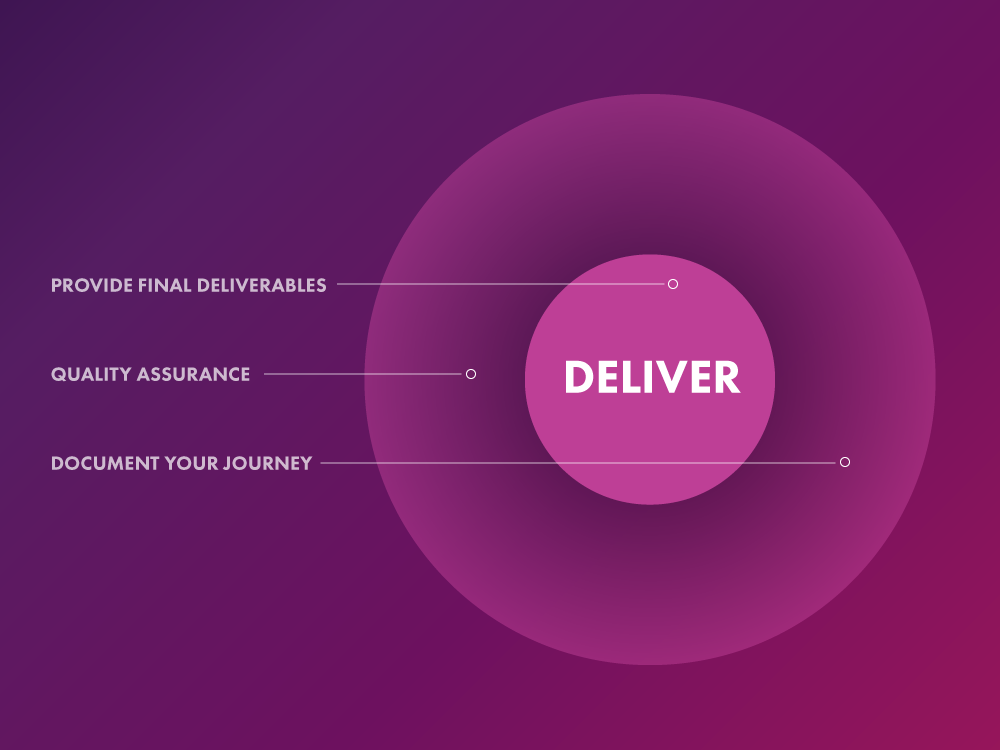
When handing off LOTS of deliverables, we always like to offer quality assurance time to help with implementation and/or making sure everything is received as expected. This allows for last-minute feedback to be collected and tweaks as needed. Just remember that delivery is still part of the iterative process for a reason — celebrate your accomplishment but expect tweak requests as new information is gathered.
Collect Feedback and Document Your Journey
At this point, It may be tempting to sit back and bask in your success and genius of completing such a wonderful project, but based on experience, we highly recommend riding on your project momentum high just a tad longer so you can go around and collect another round of feedback and data points on your project now that it's been handed off.
We've made the mistake of waiting in the past to get that timely feedback and it doesn't feel as valuable collecting it later; you get a lot of:
"oh ummmm — I think I remember it going really well and I'm pretty sure mostly everyone at least kind of liked it!"
It's been so much more rewarding to collect all that information while it's fresh on everyone's minds, and plus it provides a chance to learn how to improve your own personal UX process and also an opportunity to create ongoing touchpoints (if necessary/desired) to keep tabs on the project and see how it's doing in the wild.
Plus isn't it more fun to see something you create not just live but thrive?
Congratulations, you're a User Experience Designer.
Conclusion
While every UX process is unique, the key components that differentiate user experience processes from any other are the iterative nature of the design phase and the research and feedback collected with a human-centric focus order to build and iterate and find the best solution. If you take the time to research, test and iterate on your creations and assumptions, you're halfway there to being a user experience designer with skills that can be put to use in any area of life!
Whatever process you decide to try out, just remember the key components that differentiate a user experience process from any other:
- Steps Are Iterative and Cyclical,
- Each Process Incorporates Design Thinking,
- Each Process is "Human-Centered" at Its Core.
Go forth and create. To see this process applied to a real award-winning fintech product, read how SeaLab used data-driven, human-centric design to transform the Kasasa loan and mortgage experience.