AI isn't a bolt-on feature. It's a living part of a product that will shape and be shaped by the people who use it. We take an interactional stance: humans create technologies; those technologies reshape human experience; and round we go. As Kranzberg put it, "technology is neither good nor bad; nor is it neutral." Translation: design matters.

At SeaLab, we help teams design AI products people can trust and adopt. This article is a pragmatic playbook you can ship from: it bridges Ethan Mollick's Co-Intelligence (how to work with AI) with Value Sensitive Design (VSD) (how to align AI with human values). Inside: a rule-to-practice map, recipe-style agent patterns, and a minimum-viable toolkit you can copy into your workflow. Use it to decide where AI belongs, make it legible and safe, and measure real value.
Quick references
- Value Sensitive Design Research Lab (methods & free toolkits): https://vsdesign.org
- Envisioning Cards (free download): https://vsdesign.org/toolkits/envisioningcards · PDF: https://vsdesign.org/ecdocs/Envisioning_Cards_Double_Sided_Print-07-2024.pdf
- Value Sensitive Design: Shaping Technology with Moral Imagination (MIT Press): https://mitpress.mit.edu/9780262039536/value-sensitive-design/
- Co-Intelligence: Living and Working with AI (Portfolio/Penguin): https://www.penguinrandomhouse.com/books/741805/co-intelligence-by-ethan-mollick/
How to use this map for building ethical AI
- Choose an AI role that fits the job to be done.
- Map stakeholders & values (who's helped/harmed; what matters).
- Select patterns & guardrails aligned with your team's values that make the role safe and legible.
- Track metrics tied to values; ship, observe, adjust.
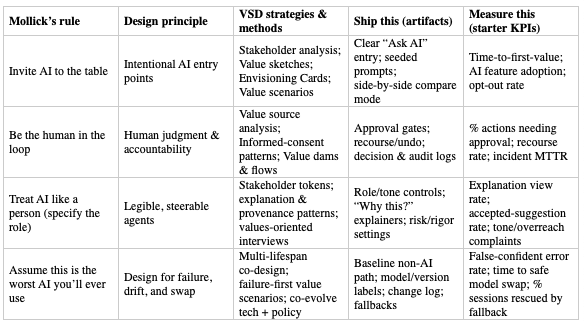
After creating an AI with a role, identify your team's priority values, run the VSD method(s), ship the artifacts, and track the starter KPIs. Iterate.
Roles & core patterns (AKA recipe cards!)
To see these patterns applied in a live production context, read how we engineered prompts and agent behaviors for an enterprise AI hiring platform. For a product-design-focused view of AI SaaS UX in practice, see our FOMO.ai case study.
Use these starter templates to spin up effective AI personas.
AI as a Person (without pretending it's human)
- Use for: Guidance, explanations, light drafting; low-medium stakes; transparency matters.
- Inputs: User instruction, relevant context, allowed tools.
- Outputs: Suggestions, explanations, drafts, with sources/provenance when possible.
- Success: Users can steer tone/rigor; helpful, reversible suggestions; no deceptive mimicry.
- Starter prompt: "You are a helpful, honest explainer. When unsure, say so. Answer in short steps. Ask one clarifying question if needed, then propose next actions."
- UX patterns: Role banner; tone slider (formal to casual); "Why this?"; Show sources; Try again/Undo.
- Safety: Persistent AI label; no impersonation; mark synthesized content.
AI as a Creative
- Use for: Brainstorming, first drafts, audience/channel variants.
- Inputs: Brief (goal, audience, constraints), examples, style/tone.
- Outputs: Multiple variants; critique notes; remix/translate/expand/condense.
- Success: Faster to usable draft; clear lineage; easy A/B; human remains editor-in-chief.
- Starter prompt: "You are a critical creative partner. Produce 3 distinct options for [deliverable] per brief, then critique each option's strengths/risks in 3 bullets."
- UX patterns: Generate, Critique, Vary; side-by-side compare; Keep/Discard; style presets; export with citations.
- Safety: Label AI-generated content; warn about fictionalization; make source checks easy.
AI as a Coworker
- Use for: Structured tasks (summarize, extract, triage, draft), or multi-step workflows.
- Inputs: Task, scope, constraints, acceptance criteria, tools/APIs, deadline.
- Outputs: Artifact (doc/table/plan) + execution log + open questions.
- Success: Fewer back-and-forths; traceable steps; safe autonomy tiers.
- Starter prompt: "You are a meticulous analyst. Task: [scope]. Constraints: [rules]. Deliver: [artifact] that meets this checklist: [DoD]. Ask for missing inputs before proceeding."
- UX patterns: Delegate task form; progress tracker; approval gates; sandboxed actions; audit log.
- Safety: Permission tiers (read, suggest, act with approval, sandboxed act); always show what was done and why.
AI as a Tutor
- Use for: Onboarding, learning new tools, complex decisions where understanding matters.
- Inputs: Topic, prior knowledge, goal, timebox.
- Outputs: Stepwise explanations, examples, quick quizzes with feedback, links for study.
- Success: Better comprehension and confidence; fewer support tickets.
- Starter prompt: "You are a patient tutor. Explain [topic] for a beginner in 5 short steps. After each step, ask a simple check question. Adjust depth based on answers."
- UX patterns: Level selector (beginner/intermediate/advanced); Practice: progress meter; recap cards; glossary.
- Safety: Avoid overreach; cite sources; encourage verification for high-stakes topics.
AI as a Coach
- Use for: Productivity, wellness, skill-building where accountability helps.
- Inputs: Goals, constraints, schedule, preferences.
- Outputs: Action plans, right-time nudges, reflection prompts, progress snapshots.
- Success: Realistic plans; respectful reminders; visible progress; easy snooze/stop.
- Starter prompt: "You are a supportive coach. Help set a realistic weekly plan for [goal] given [constraints]. Offer 3 small steps, then ask me to commit to one."
- UX patterns: Goal, plan, reflection loop; nudge settings; streaks without shame; weekly digest; Pause coaching.
- Safety: Respect off-hours; avoid medical/mental-health claims unless certified/regulated.
Toolkit & Ops: build AI safely and fast
AI introduces new failure modes (confident errors, drift, misuse). These are minimum viable rails for any team.
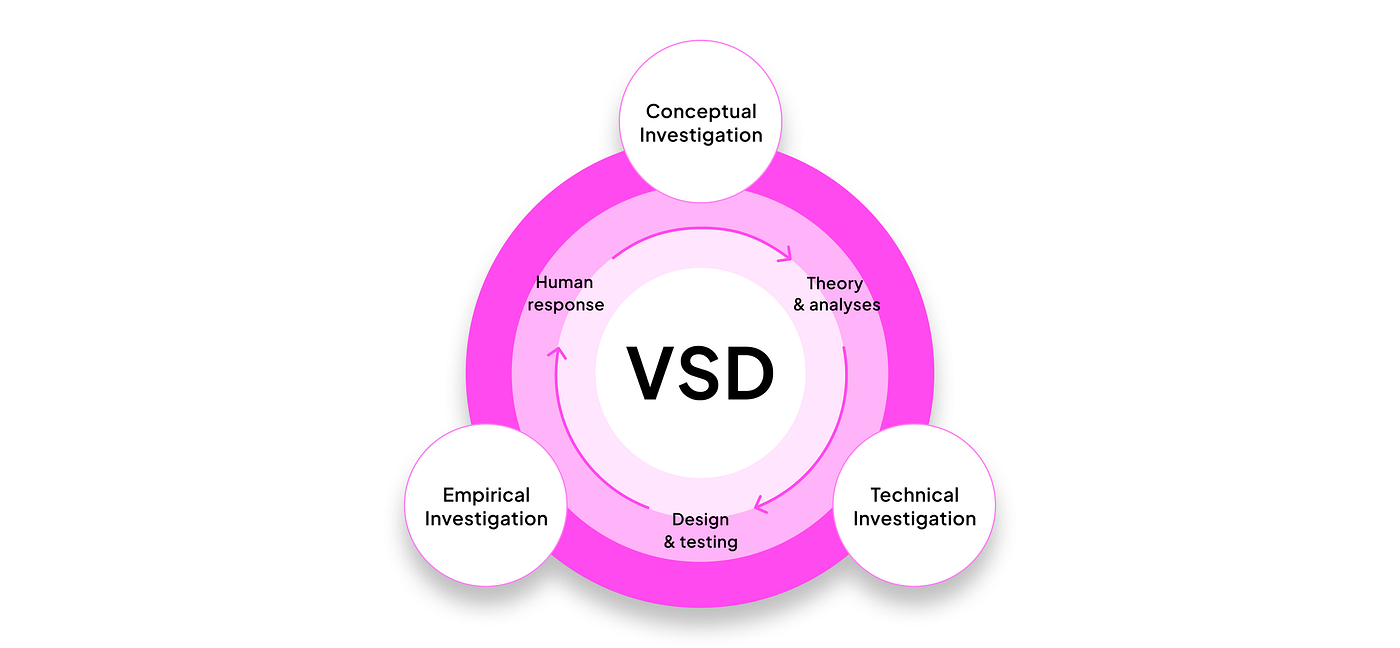
Discover & Frame
Stakeholder analysis (direct & indirect):
- What: who uses/is affected.
- Why: avoid blind spots/harm.
- Start: list users, data subjects, bystanders, regulators, support.
- Output: table of goals/risks/protections.
- Pitfalls: designing only for buyers.
Stakeholder tokens (quick personas)
- What: one-card personas capturing needs/values.
- Start: name, role, key values (privacy, speed), top risk, success metric.
- Output: 5-7 tokens to surface tensions.
- Pitfalls: demographic over-specification.
Value source analysis (laws, norms, ethics)
- What: inventory constraints.
- Why: avoid rework/compliance surprises.
- Start: list laws, internal policies, standards; link to features.
- Output: checklist used in PRD/reviews.
- Pitfalls: "legal only" mindset.
Ethnographically informed inquiry
- What: observe real workflows.
- Start: watch 5 users; note workarounds and trust/distrust moments.
- Output: top 5 insights + design implications.
- Pitfalls: asking hypotheticals.
Value scenarios (near/edge/failure)
- What: short future narratives.
- Why: surface harms/opportunities early.
- Start: three 6-sentence scenarios; mark triggers/impacts/mitigations.
- Output: scenario board for reviews.
- Pitfalls: happy-path only.
Envisioning Cards
- What: prompts to uncover blind spots.
- Start: 30-min pre-sprint; each person names 1 risk + 1 mitigation.
- Output: 3 risks/mitigations in sprint doc.
- Pitfalls: theater without scope changes.
Multi-lifespan timeline & co-design
- What: consider effects over years/decades.
- Start: 1-/5-/10-year timeline; note data/model aging.
- Output: long-term risks/commitments in roadmap.
- Pitfalls: ignoring end-of-life/handover.
Design & Make
Value sketches
- What: 1-pagers linking UI to values.
- Start: mock, value(s), risk(s), metric, open questions.
- Output: set of sketches to pick patterns.
- Pitfalls: vague values; add measurable proxy.
Value-oriented prototypes/field tests
- What: build just enough to test value assumptions.
- Start: prototype riskiest assumption (e.g., will users read explanations?).
- Output: evidence to guide scope.
- Pitfalls: over-building.
Model for informed consent online
- What: UI + copy for data use, choices, revocation.
- Start: consent dialog with plain language, toggles, "Learn more"; portable settings.
- Output: reusable component.
- Pitfalls: one-time, undiscoverable consent.
Value dams & flows
- What: identify opposed vs. propelled features.
- Start: mark red-lines vs. excitement from tokens.
- Output: matrix guiding MVP.
- Pitfalls: shipping flows that hit a hard dam.
Co-evolve tech & social structure
- What: change process/policy/training with UI.
- Start: per-feature 1-pager: SOP updates, training, owners.
- Output: launch plan with org changes.
- Pitfalls: assuming UI alone changes behavior.
Measure & Learn
Values-oriented interviews
- What: probe trust, control, fairness, recourse.
- Start: ask "When would you trust/distrust this? What would you need to undo/appeal?"
- Output: themes + changes.
- Pitfalls: NPS/CSAT only.
Scalable assessments (accuracy, calibration, privacy, explainability, recourse)
- What: batch tests for model + UX.
- Start: small eval sets (10-50) per dimension; automate in CI.
- Output: dashboard with thresholds.
- Pitfalls: accuracy-only; track false-confident errors.
Action-reflection cycles
- What: ship small, observe, adjust.
- Start: weekly telemetry + feedback review; link changes to value metrics.
- Output: changelog with "why."
- Pitfalls: ship-and-forget.
Operational guardrails
Prompt & system design libraries
- What: versioned prompts/roles.
- Start:
prompts.md(purpose, inputs, rules, failures, examples) in Git. - Output: reusable prompts.
- Pitfalls: hidden, drifting prompts.
Model & data sheets + eval sets
- What: docs for intended use/limits and tests.
- Start:
model-card.md,data-sheet.md,/evalsfolder. - Output: transparent model/data choices.
- Pitfalls: hand-wavy "intended use."
Bias slices, robustness, false-confident errors
- What: tests across groups/tricky inputs.
- Start: define slices (language, region); template evals; fail on regressions.
- Output: CI job + trends.
- Pitfalls: one-off audits.
Red-team drills in CI
- What: adversarial tests (jailbreak/misuse).
- Start: top 10 "don'ts" as prompts; verify refusal/routing.
- Output: automated suite.
- Pitfalls: sporadic manual tests.
Incident playbook
- What: steps when AI harms/derails.
- Start: 1-page detect, contain, notify, remediate, learn; assign on-call.
- Output:
ai-incident-playbook.md+ runbook. - Pitfalls: chaos in the first incident.
Telemetry
- What: privacy-aware logs of prompts, outputs, corrections, recourse, explanation views.
- Start: log minimal fields with retention; add Report issue and Was this helpful?
- Output: dashboard tied to value KPIs.
- Pitfalls: data hoarding; no opt-out.
Starter templates
prompts.md · model-card.md · data-sheet.md · /evals/*.csv · values-metrics.md · ai-incident-playbook.md
Making VSD Work at Industry Speed
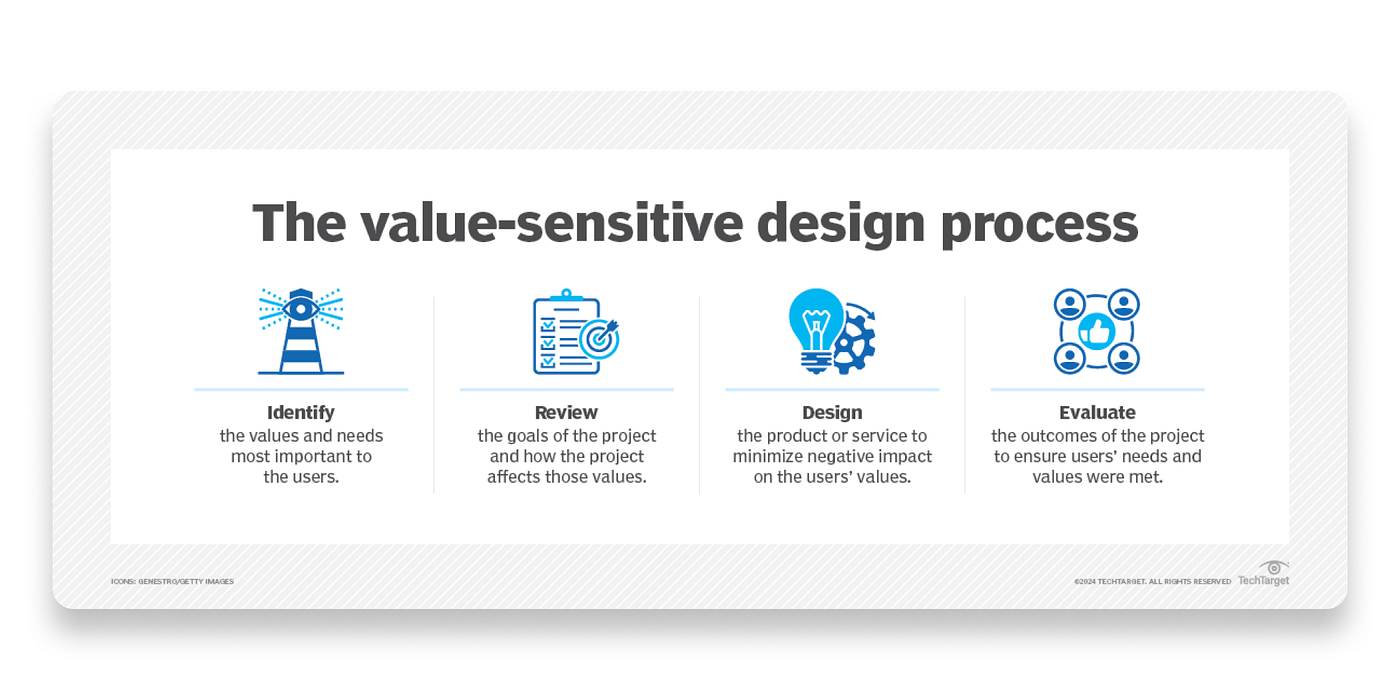
Make values operational — add Value Acceptance Criteria to user stories; pair each value with a measurable proxy. Right-size methods — 30-min Envisioning Cards; stakeholder tokens for v1; failure playbook from scenarios. Tie ethics to economics — map values to cost centers (churn, incidents, audits, TAM) and add to the business case. Put guardrails in the pipeline — Model Cards/Data Sheets at PR; red-team & bias slices in tests; release gates for sensitive features. Design for legibility — explainability patterns; calm defaults; portable, revocable consent. Keep a value change-log — one doc linking decisions to evidence and telemetry.
Work with us
- Want a fast outside view? Book a lightweight AI design review to stress-test your flows and guardrails.
- Need patterns you can paste into your repo? Work with us for a starter library (prompts, consent component, "Why this?" microcopy, model labels, eval templates).
- Rolling out a sensitive feature? We can help pilot a value sprint: ship, observe, adjust with clear gates. See how we applied these principles to a live AI-driven SEO product.
- Ready to build? Let's design AI-powered products your users trust.
Attribution & Further Reading
- Friedman & Hendry, Value Sensitive Design: Shaping Technology with Moral Imagination (MIT Press).
- Mollick, Co-Intelligence: Living and Working with AI (2024). See also ongoing essays on AI as coworker, coach, tutor.